
Edulog Parent Portal
EdulogEducation
4.1930.00 Reviews
- Version
- 1.18.4
- Installs
- 100.00K
- Age Rating
- Everyone
Screenshots
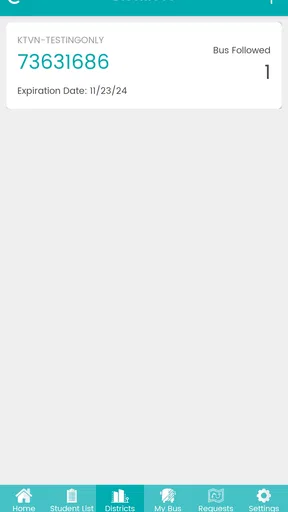
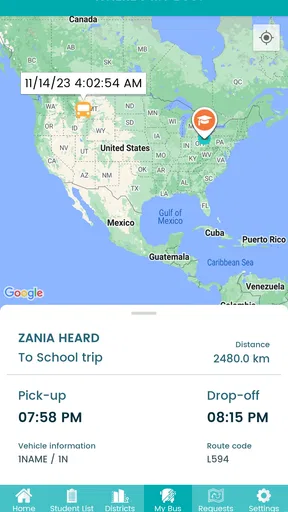
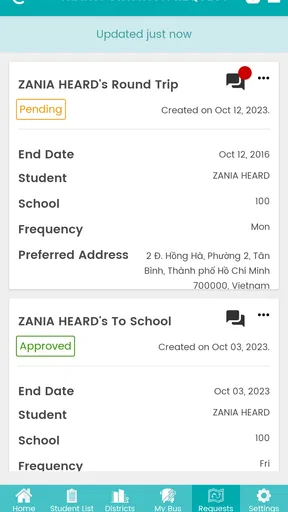
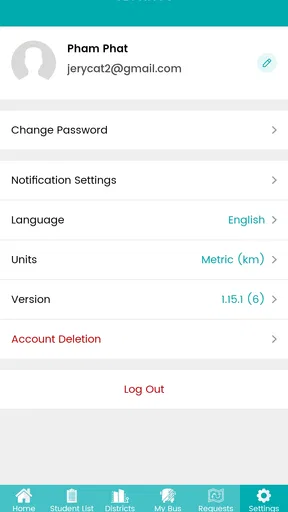
Our Review of Edulog Parent Portal
 Analysis by Appyee
When a child depends on school transportation, the difficult part is often not the ride itself. It is knowing what is happening before the bus arrives, whether a change has been made, and where to look when the morning does not follow the usual routine. Edulog Parent Portal is an education app from Edulog that puts transportation information into a parent-focused mobile view. I see it as a practical companion for families whose school or transportation provider already uses the Edulog system, rather than as a general-purpose school communication app.
That distinction matters from the beginning. This is not an app I would install expecting it to discover every school-bus service in an area or replace a school’s normal communication channels. Its value depends on the transportation setup connected to a child’s school. When that connection is in place, the app can make a very specific daily task easier: checking transportation information without searching through messages, calling the office, or relying entirely on a child to remember what changed.
I tested it with that real-world question in mind: does it reduce uncertainty for a parent, and is it worth adding another app to an already crowded phone? My answer is generally yes for families who have access to the supported transportation service, especially when schedules are complicated or children travel independently. For families whose school does not use the relevant system, however, the app is not a useful workaround.
How I would decide whether Edulog Parent Portal fits
My first decision criterion would be compatibility with the child’s school transportation arrangement. The app’s purpose is narrow, and that is a strength only when the school or district has made it part of the transportation workflow. Before spending time setting it up, I would confirm with the school office or transportation department that parents are expected to use Edulog Parent Portal. This is more important than the app’s rating or appearance because a polished transportation app cannot provide useful information without the right school connection.
The second criterion is the kind of uncertainty a family faces. If a child always leaves and returns with a parent, the app may not change much. If a child uses a bus, walks to a stop, attends an after-school activity, or has a caregiver who needs the same information, a dedicated portal becomes more valuable. I would also consider how often the family deals with schedule changes. A parent who checks transportation details only occasionally may prefer the school’s existing messages, while a family that checks every morning benefits more from a focused tool.
The third criterion is whether the app supports the parent’s routine without creating a second source of truth. I would not treat it as a replacement for official school notices. If the school sends a direct message about a canceled route, an altered pickup arrangement, or an emergency, that message remains important. The portal is most useful when it gives transportation context in one place, while the school’s broader communication channels continue to handle announcements and instructions.
There is also a practical question about who needs access. One household may have parents, grandparents, babysitters, or separated caregivers sharing transportation duties. A portal can be useful when responsibility changes from day to day, but only if everyone follows the same account and notification habits. I would agree on one simple routine: whoever is responsible for the child checks the transportation information before the morning becomes rushed, rather than assuming another adult has done it.
A realistic morning where the app earns its place
Imagine a parent preparing breakfast while a child gets ready for school. The child normally leaves at the same time, but a road closure or route adjustment has made the morning less predictable. Instead of asking the child to remember a message from the previous evening, the parent opens the portal and checks the transportation details connected to the account. The useful part is not that the app makes the bus arrive faster; it gives the adult a clearer basis for deciding when the child should be ready and whether extra time is needed.
That small change can prevent a common handoff problem. A caregiver may know that the child is taking the bus but not remember the relevant stop information. A parent may be at work when the child returns. A grandparent may need a quick way to confirm the transportation plan without sorting through a long school email. In these situations, a dedicated transportation view is more practical than a general school app filled with lunch menus, grades, calendars, and classroom updates.
I would still build a backup habit. Technology should support the routine, not become the only thing holding it together. Keeping the school’s phone number available and teaching the child the normal plan are sensible safeguards, particularly when a device is unavailable or an account needs attention. The app is best used as a quick reference point, not as permission to stop paying attention to official instructions.
What makes the focused design useful
The clearest advantage is concentration. Edulog Parent Portal is designed around a child’s transportation rather than attempting to become a complete family-school dashboard. That focus can make the app easier to understand at the exact moment a parent needs an answer. I prefer this approach to opening a broad school platform and hunting through unrelated sections for bus information.
Another strength is shared responsibility. Transportation details are often handled by more than one adult, and a parent portal gives the family a common place to check. This is particularly useful for alternating custody schedules or households where a child is collected by different caregivers during the week. My advice is to decide in advance which adult checks the app on each day. That turns the portal from a passive installation into part of a dependable routine.
The app is also a better fit for parents who want transportation information separated from schoolwork. A school learning platform may be excellent for assignments and teacher communication but awkward for daily travel planning. Conversely, a messaging app may contain important notices but make it difficult to distinguish a current transportation detail from an older conversation. A dedicated portal reduces that particular kind of clutter.
Its public adoption also suggests that it is not an obscure experiment. The app has an average rating of 4.1 from around four thousand ratings, with more than nine hundred written reviews, and it has passed over one hundred thousand installs. I treat those figures as useful context rather than a guarantee. A transportation app can work well for one district and feel limited in another because the connected school setup determines much of the experience.
Small habits that make the portal more reliable
One useful habit is checking the portal at the same point in the morning instead of repeatedly refreshing it. For example, a parent can look after the child is dressed and before leaving the house. This creates a consistent checkpoint and avoids turning transportation information into a source of constant anxiety. If something looks different, there is still time to contact the school or make another arrangement.
A second habit is checking the account when a child’s routine changes. If the child is attending an activity, staying with another caregiver, or following a different afternoon plan, I would verify the transportation details before the change becomes urgent. The app is most valuable when it is used proactively, not only after a missed pickup or confusing message.
A third insight is to separate “information found in the portal” from “permission to change the plan.” A parent may see transportation details, but that does not automatically mean a child should be sent to a different location or collected by someone new. I would use the portal to understand the transportation arrangement and the school’s established process to authorize changes. That distinction prevents a convenient information tool from being mistaken for a complete attendance or dismissal system.
Finally, I would review the app after the first week rather than judging it after the initial installation. The important test is whether it answers the questions that actually arise in that household: where to check, when to check, and what to do when the information differs from expectation. If it does not reduce those questions, the family may need clearer guidance from the school rather than more time spent exploring the app.
Where other choices may fit better
The usual alternatives fall into three broad groups: a school’s general-purpose parent app, email or text notices, and direct contact with the transportation office. Each can be better in certain situations, and I would not recommend Edulog Parent Portal simply because it is dedicated to transportation.
A general school app may be the better choice when a family wants one place for attendance, grades, teacher messages, calendars, and transportation. Its advantage is consolidation. Parents do not need to remember which app handles which responsibility. The trade-off is that transportation information may be less prominent, and a broad platform can take longer to navigate when the only question is whether the child’s ride is proceeding as expected.
Email and text messages can be better for urgent, school-wide changes because they reach parents through channels they already monitor. They are also useful when a family has limited app storage, unreliable access to a portal, or several adults who do not share the same account. Their weakness is organization. A message can be buried, forwarded without context, or confused with an older update. Edulog Parent Portal makes more sense when the family wants a transportation-specific place to return to.
Calling the transportation office remains the best option for unusual cases. If a child’s stop appears incorrect, a caregiver needs clarification about a one-time arrangement, or the portal does not match an instruction from the school, a conversation with the responsible office is more appropriate. I would not use the app as a substitute for resolving an account or routing problem. A portal can display information; it cannot personally interpret every exception in a child’s schedule.
Families should also consider whether the child is old enough to manage part of the routine. For a younger child, the app mainly serves the adults. For an older child who travels independently, it can support a shared check-in habit, but I would still avoid making the child solely responsible for monitoring changes. The right balance depends on maturity, distance, and the family’s backup plan.
There is a clear situation in which I would skip this app: when the school does not use Edulog Parent Portal or cannot connect the family’s account to the relevant transportation information. In that case, installing it will not solve the underlying problem. I would instead use the school’s established method and ask which channel should be treated as authoritative. I would also choose a broader school app over this one if transportation is only a minor concern and the family already has a reliable all-in-one system.
What to expect during setup and daily use
I would approach setup as an account-linking task, not as a standalone map or travel app. Have the child’s school information and any instructions from the transportation department nearby, and use the exact details the school provides. If the portal asks for information that does not match the family’s records, I would stop and contact the school rather than repeatedly guessing. Incorrect attempts can create more confusion than a short clarification call.
Once access is working, I would keep the app in an easy-to-reach location on the phone and decide who checks it. That sounds basic, but it addresses a real weakness of many parent tools: everyone assumes someone else is watching. A transportation portal only improves a routine when the family gives it a defined role.
For daily use, I would check before the child leaves and again when an afternoon pickup is the adult’s responsibility. I would not keep it open all day waiting for reassurance. That approach wastes attention and can encourage parents to interpret every small change as a crisis. A scheduled check, followed by direct contact when something is genuinely unclear, is more sensible.
The app is free, which removes the financial barrier to trying it. The more meaningful cost is attention: learning another login, remembering another notification source, and deciding how it fits with school email or messaging. I would call that the cost of switching, even when no payment is involved. If the school recommends it for transportation, that effort is usually reasonable. If the family already has a dependable process, the benefit may be too small to justify another routine.
On device compatibility, the current version is 1.18.4 and the listed minimum operating system is Android 9. That makes the technical requirement relevant for families using older phones. I would check the device before planning around the app, especially if a caregiver relies on an older handset. The app is rated for Everyone, and its education category reflects its practical parent-and-school purpose rather than entertainment or classroom instruction.
How much trust should a parent place in it?
I would trust the portal as one useful view of transportation information, but not as the only safeguard around a child’s travel. The app’s usefulness depends on the accuracy and timeliness of the connected school transportation operation. If a parent notices a mismatch between the portal and a direct school instruction, the direct instruction deserves immediate attention and clarification.
That is not a criticism unique to this product; it is a trade-off of any connected school service. The convenience of a central portal comes with the responsibility to keep account details and family routines aligned. Parents should also explain to children what happens if the normal ride changes: where to wait, which adult to contact, and what not to do. The app can help the parent prepare, but it cannot replace that conversation.
I also would not expect it to answer broader school questions. It is not the right place to look for homework, teacher feedback, cafeteria information, or a complete academic calendar unless the school separately provides those through another service. Keeping expectations narrow is part of getting value from it. The portal is strongest when the question begins with transportation.
The switching decision in practical terms
If a family currently relies on scattered emails, screenshots, and memory, moving to Edulog Parent Portal may simplify the transportation portion of the day. The transition cost is mainly setup and habit formation. I would spend one week comparing the portal with the school’s messages, noting whether it is easier to find current transportation information and whether all responsible adults can use it consistently.
If a family already uses a general school platform successfully, switching entirely may be unnecessary. The better approach could be to keep the existing app for school communication and use this portal only for transportation if the school supports both. That avoids forcing one tool to handle a job it was not designed for.
If the portal creates repeated confusion, the answer may not be another app. It may be a missing account connection, outdated school information, or a misunderstanding about which channel the transportation office updates. I would document the specific problem and ask the school a focused question. “Which source should I use for today’s transportation status?” is more useful than simply reporting that the app feels confusing.
The app’s release history also makes me cautious about judging it solely by first impressions. It was released on July 31, 2018, and has continued to a current version of 1.18.4. For me, that indicates an established product rather than a brand-new utility, but the practical experience still depends on the local implementation. A long-running app can remain valuable while individual families encounter different setup or communication issues.
My recommendation for families making the choice
I recommend Edulog Parent Portal to parents whose child’s school or transportation provider directs them to use it, especially when multiple caregivers share pickup duties or the child’s route is an important part of the daily schedule. Its focused purpose is its main advantage. Instead of competing with every school tool, it addresses one recurring concern and gives parents a dedicated place to check.
I would recommend trying it with a defined routine rather than installing it passively. Confirm the school connection, complete the account setup carefully, choose who checks it, and keep the school’s official contact method available for exceptions. After several normal school days, ask whether the app has reduced searching and uncertainty. If the answer is yes, it has earned its place on the phone.
I would not recommend it as a universal transportation solution, and I would not choose it over a reliable all-in-one school platform when the family’s main need is broader communication. It is also not the right answer for a school that does not support the service. In those cases, a direct school channel or existing parent system will be more useful.
Overall, I see Edulog Parent Portal as a sensible, free education app with a narrow but worthwhile job. The rating of 4.1 and its base of around four thousand ratings show that many parents have found value in it, while the written feedback count of more than nine hundred suggests there is enough user experience behind the product to take seriously. I would still judge it by the local school connection, not by the numbers alone.
For the right household, the benefit is simple: less time wondering where transportation information lives and more confidence before the child leaves home. That is not a flashy promise, but it is exactly the kind of small improvement that can make a school morning calmer. If your child’s transportation service supports it, I think it is worth trying; if not, choose the communication channel your school already treats as official.
Verdict
Strengths of Edulog Parent Portal
- Quick access to grades, attendance, schedules, and school announcements.
- Direct communication with teachers and school staff in one place.
- Push notifications help parents stay updated on important changes.
- Supports better organization of homework, events, and academic deadlines.
- Useful overview of a child’s progress without needing a computer.
Limitations of Edulog Parent Portal
- Features may vary depending on the school’s Edulog setup and subscription.
- Some information can appear late if staff do not update the portal promptly.
- Parents may need separate accounts for children at different schools.
- Notification settings can require manual adjustment to avoid missed updates.
- The interface may feel less intuitive for first-time users.
Similar Picks in This Category
View All
Duolingo: Language Lessons
Duolingo4.7

Google Classroom
Google LLC2.8

Unacademy: Learn & Crack Exams
Unacademy3.2

Bible App for Kids
Life.Church4.4

Cake - Learn English & Korean
Cake Corp.4.7

Brainly: AI Homework Helper
Brainly4.5
Frequently Asked Questions
What is Edulog Parent Portal used for?
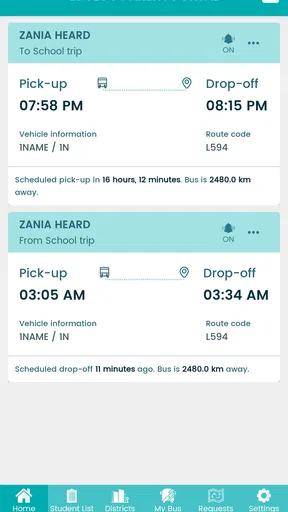
Edulog Parent Portal is designed to help parents and guardians access school transportation information in one place. Depending on the school district’s configuration, you may be able to view a child’s assigned bus, stop location, pickup and drop-off times, route details, transportation notices, and service updates. Available features can vary between districts, so the information shown after signing in may not be identical for every family.
How do I sign in to Edulog Parent Portal?
To use Edulog Parent Portal, you generally need an account or login details provided by your child’s school district or transportation department. Registration requirements may include a student identification number, guardian information, or an email address already associated with school records. If your credentials do not work, or your child is not listed, contact the district rather than creating multiple accounts, because access is usually connected to official student transportation records.
Can I track my child’s school bus in real time?
Edulog Parent Portal may provide bus location, estimated arrival information, or transportation alerts when the school district supports those functions and the vehicle is equipped with the required tracking technology. However, it should not be assumed that every route offers continuous live tracking. Data can be delayed or unavailable because of network coverage, GPS limitations, schedule changes, or temporary technical problems, so parents should still rely on the official school transportation schedule.
Can more than one child or guardian use the same Edulog account?
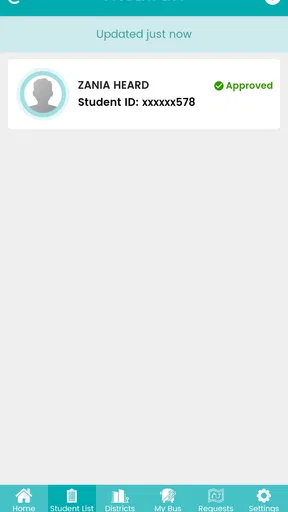
The ability to manage multiple children or share access with another guardian depends on how the school district has configured Edulog Parent Portal. Some accounts may display several students linked to the same household, while others require separate access or additional verification. After signing in, check the student selection and profile settings. If a child is missing or another guardian needs access, the school transportation office can explain the correct procedure.
Is Edulog Parent Portal free, and what permissions does it require?
Edulog Parent Portal is typically provided to families at no additional charge when their school district uses the service, although mobile data charges may still apply. The app may request permissions such as notifications, location, or internet access to support alerts and transportation features. You should review the permissions shown during installation and enable only those needed. Some functions may not work fully if required notifications or location-related access are disabled.
